Codex is OpenAI's official coding agent — not a chatbot, but an "AI programmer" that reads your code, edits files, runs commands, and reviews changes. It comes in four forms: a CLI (for the terminal), an IDE extension (VS Code / Cursor), a desktop app, and a cloud version. This article covers only the CLI, the most common and cheapest option, from install to getting a real task done.
The hard part of using Codex in China isn't the install (that's three commands). It's which service to point it at. The official endpoint isn't reachable directly from mainland China, so you need a relay address. The workflow below was actually run on Codex CLI 0.163.0, including the "have it genuinely edit code" step — full real-world logs are in the article.
Codex installs fine on Windows, but when it runs commands it leans on Linux tooling, so WSL2 is strongly recommended (Windows' built-in Linux subsystem — set it up once and you're done for good). Open a terminal as administrator and run:
wsl --install
wsl --set-default-version 2
wsl --install -d Ubuntu-22.04
Reboot when it's done, open Ubuntu from the Start menu, and set a username and password. From here on, do all Codex work inside that Ubuntu window (the commands there are identical to Mac/Linux).
Don't want to bother with WSL2? Install Git Bash and run the same commands there. But when things get weird, WSL2 has the fewest gotchas.
Open a terminal (the Ubuntu window you just set up on Windows, or Terminal on Mac) and run one of these:
Option 1: npm (cross-platform, recommended)
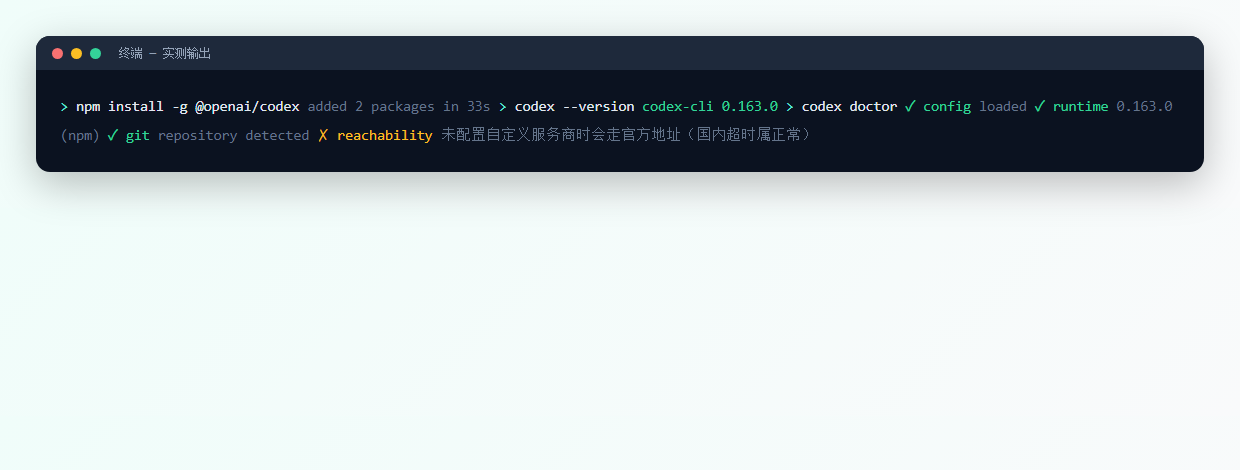
npm install -g @openai/codexOption 2: official script
# macOS / Linux
curl -fsSL https://chatgpt.com/codex/install.sh | sh
Option 3: package manager
# macOS
brew install --cask codexcodex --version
codex doctorYou should see codex-cli 0.163.0 (the version number will change with updates — any output means it's installed); codex doctor runs a health check on your environment, config, and login state.
Codex talks to OpenAI by default, which will keep timing out in mainland China. The fix is to tell it which address to use. Create (or edit) this file:
~/.codex/config.toml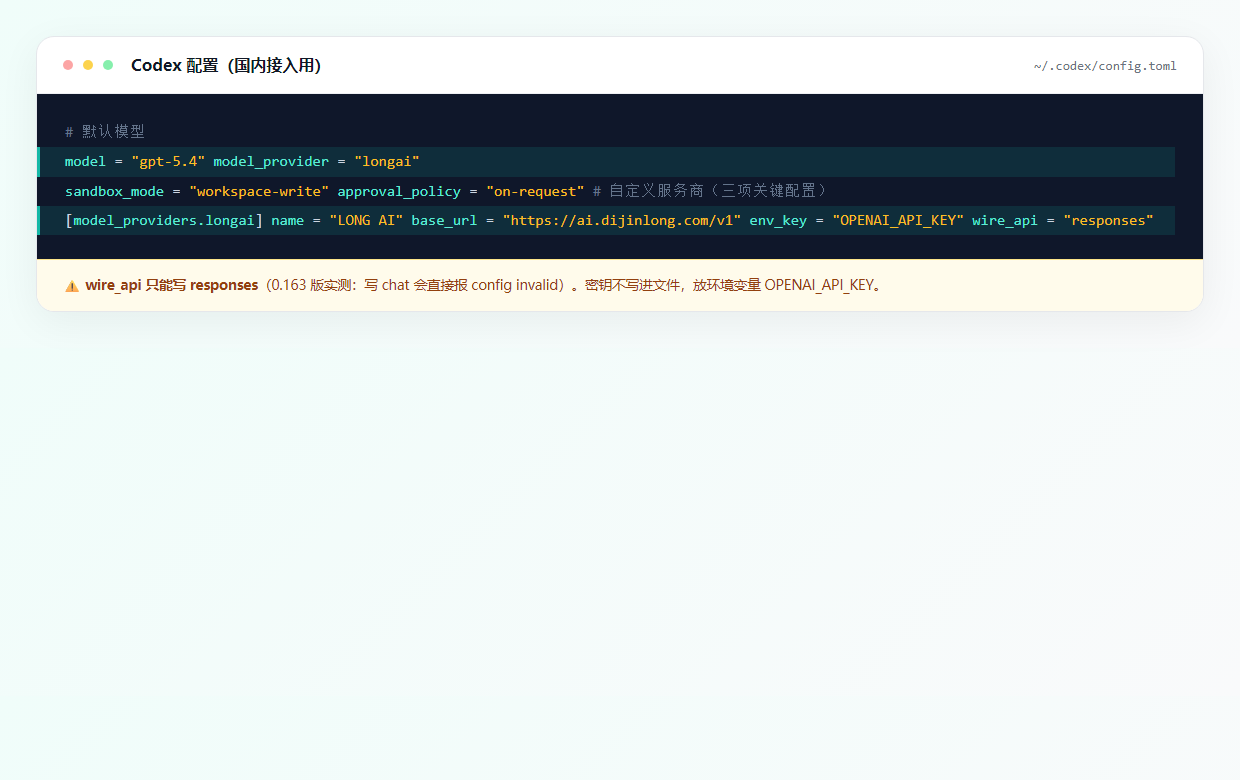
Get the endpoint and key from LONG AI after signing up: register → create one under "API Keys" → copy the model name from the model plaza.
Then put the key in an environment variable (don't write it into the config file — that's how it leaks):
# Temporary (current window only)
export OPENAI_API_KEY="your sk key"

# Permanent (write into your shell profile)
echo 'export OPENAI_API_KEY="your sk key"' >> ~/.zshrc
source ~/.zshrc
Three gotchas you need to know:
①wire_apimust be set toresponses. Writingchatorchat_completionsthrowsconfig could not be loaded — invalid data. This is a 0.163-era result, and plenty of older tutorials still get it wrong.
②base_urlmust end with/v1, and don't append/chat/completionsto it.
③ Not every model can actually do the work: some relays/models only forward chat and don't forward tool calls, so Codex will tell you it "can't access the workspace." Swap in a model that supports tool calls (in our tests glm-5.3 works, while gpt-6-luna can only chat).
Talk is cheap, so I tried it on a real bug. I prepared a Fibonacci function with a wrong base case (fib(0) recurses forever), plus a test file. Then I put it to work:
cd your-project-directory
codex exec "run python test_fib.py, find out why it fails, fix the bug in fib.py, then rerun the tests to confirm they all pass. Do not modify the test file."
It ran the tests on its own, located the wrong base case, changed 4 lines, and ran the tests again. Here's the actual screenshot (excerpt):
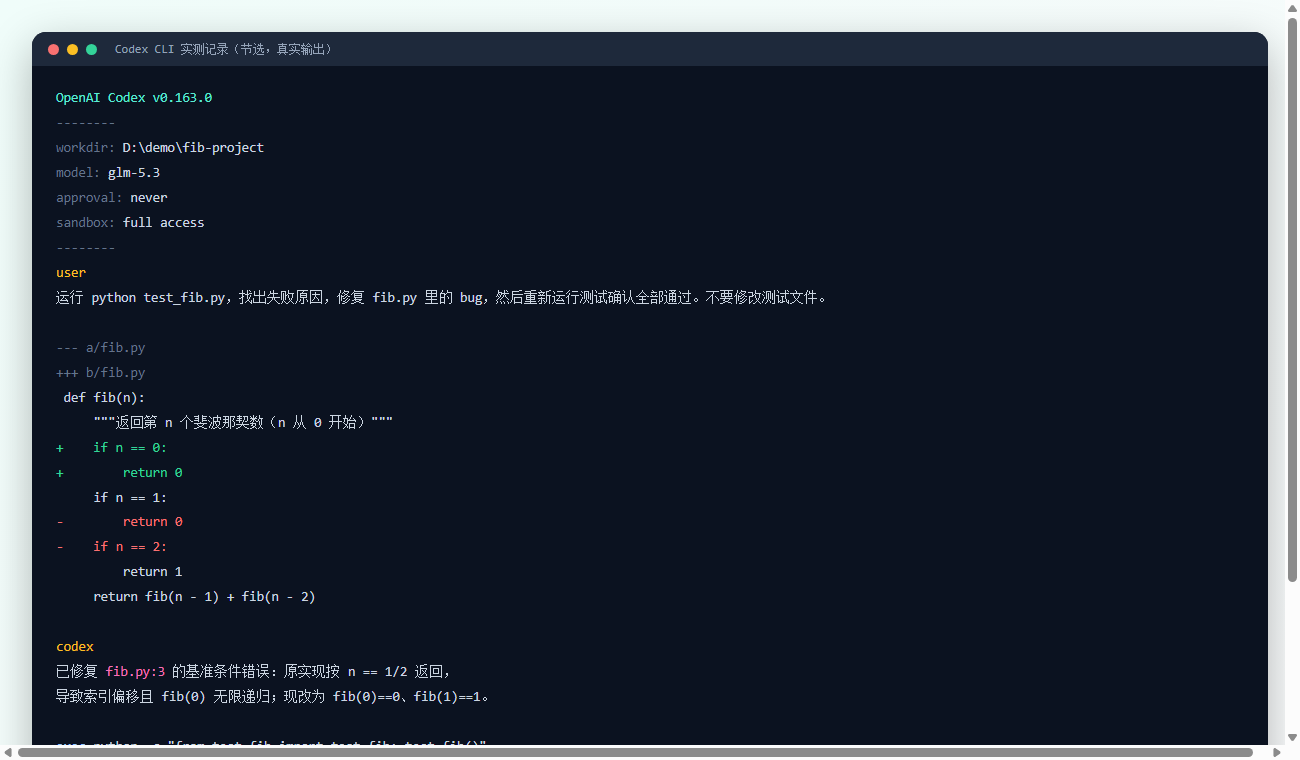
The whole task used 2,610 tokens. That's the difference between Codex and a regular chat AI: it doesn't tell you "you should change it like this" — it makes the change and proves it to you.
Tip: for your first run, give it a "small and verifiable" task (fix a bug, add a comment). Once you trust it, hand it bigger jobs.
codex — interactive mode, chat while you edit; the daily drivercodex exec "task description" — one-shot, exits when done; great for batch edits and scriptscodex review — code review; have it look over your changes for problemscodex resume --last — pick up the last session and keep goingTwo config knobs decide what it can do and whether it has to ask you first:
sandbox_mode: read-only can look but not change (safest) / workspace-write can only write inside the project folder (recommended) / danger-full-access can write anywhere (dangerous — don't)approval_policy: untrusted asks about every step / on-request only asks when it steps out of bounds (recommended) / never just does it (use with caution)For day-to-day work,workspace-write+on-requestis the sweet spot. After it edits, always check withgit diff; if you don't like it,git checkout .rolls it back in one shot.
Codex itself is free and open source — what costs money is the model calls, billed by token, pay for what you use. From the test above: fixing one bug, changing 4 lines, running the tests twice came to 2,610 tokens in total. At typical relay prices, a task like that lands in the fraction-of-a-cent range; check the model plaza for live prices.
For everyday coding, most people get through a month on a few dozen yuan. Heavy users can pick a cheap model (the deepseek family, say) for repetitive work and switch to a strong model for the hard stuff.
wire_api is wrong — set it to responsesgit init or cd into the projectbase_url is wrong — make sure it ends with /v1 and has no stray slashNote: Douyin doesn't allow its videos to be embedded on other sites, so this is a card — click it to jump over and watch.
GPT-6.2 cuts list prices 20%, yet platform discounts run deeper: gpt-6-astra trades at under 1% of list. What this week's AI price war means for buyer
Prompt caching stores a repeated prompt prefix and bills cache reads at 5-12% of normal input. Real prices, hit conditions, and how to cut your API bi
Twelve Claude versions are on sale. The newest opus-5-5 costs $8.91 a month; the oldest opus-4-6 costs $49.50. Full table and a pick for each workload
gpt-5.6-terra and deepseek-v4.1-flash win on price and reliability; gemini-3.8-flash is fastest. Effective prices, measured speed, and a three-tier pi
Point your base URL at the platform and one key covers all 138 on-sale models across 51 vendors, in both OpenAI and Anthropic request formats. Copy-pa
 LONG AI