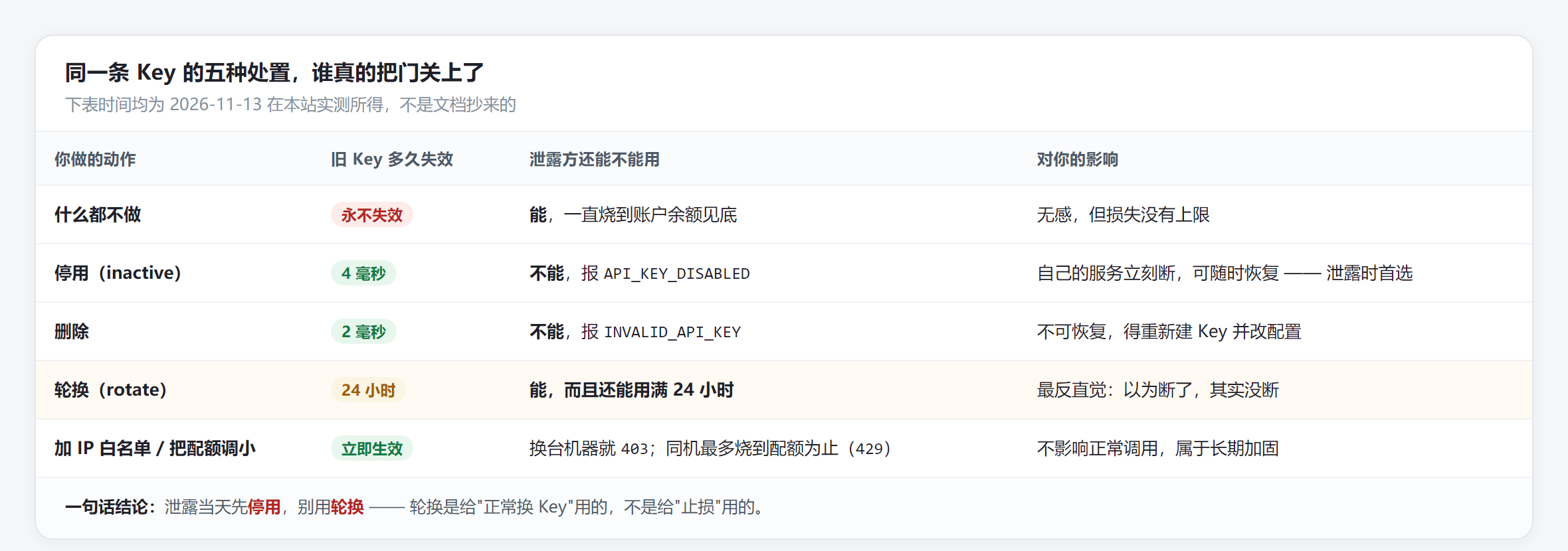
Disable the key, then create a new one to swap in. Don't click "rotate."
I measured it on our site: after rotation, the old key keeps working for a full 24 hours - the rotated_until in the response is the end of that grace period. You think you've stopped the bleeding, when you've actually handed them another day.
A key is a call credential, not your account password. I took a sk- key to the user endpoint GET /api/v1/user/profile and got 401 INVALID_TOKEN - it can't swap for account permissions, can't change the password, can't withdraw.
Only two things are really at risk: balance, and call history. So the loss has a ceiling, set by two switches: your account balance, and the quota you put on that key.
Quota deserves its own mention. I set a test key's quota to $0.0002 (under a cent) and fired gemini-3.8-flash four times - all succeeded, billing up to $0.00028941; from the fifth call on, every one returned 429 API_KEY_QUOTA_EXHAUSTED, even /v1/models got refused. Quota is that key's fuse - it cuts when the number is reached.
Same day, same account, same model deepseek-v4.1-flash - I ran all five actions and recorded status codes and timing:
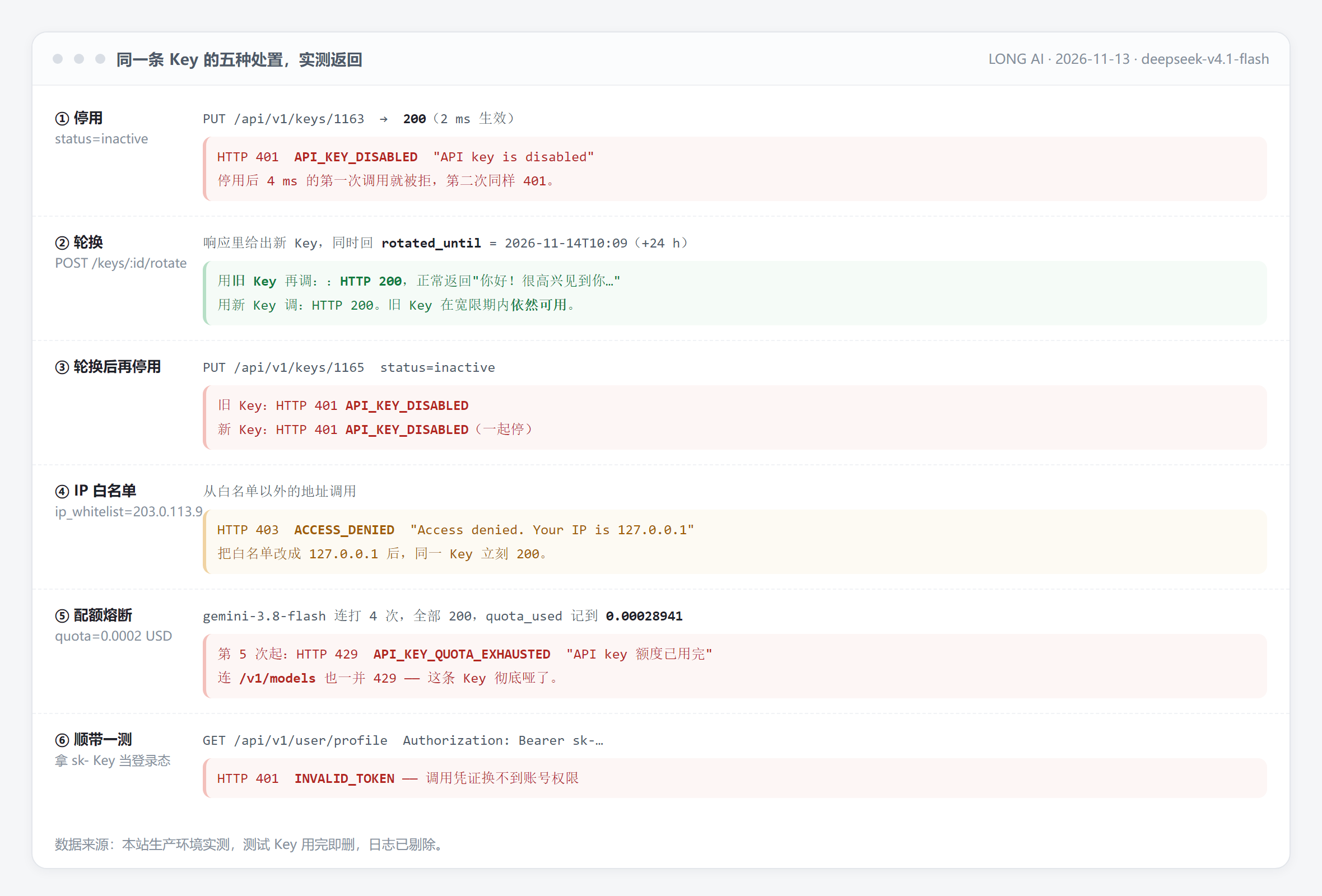
Set status to inactive, the API returns 200. 4 milliseconds later my first call was refused: 401 API_KEY_DISABLED. No cache delay, no waiting for it to take effect.
Deleting also refuses immediately, just worded INVALID_API_KEY. The difference is that deleted is deleted - your service must finish the swap at the same time, or 401 keeps firing until the config is changed.
Click rotate and the system gives you a new key while moving the old one into a grace period. In the measured response, rotated_until = 2026-11-14T10:09, exactly 24 hours after the click. I called again with the old key - 200, normal output.
Its actual purpose is "seamless key swap": let the old key live one extra day so services and clients can update config gradually. It does not solve a leak. To cut both old and new at once, you'd have to disable again - measured, both 401 together.
Set a whitelist 203.0.113.9 on a key and call from elsewhere - 403 ACCESS_DENIED, with the visitor IP echoed in the error. Change the whitelist to 127.0.0.1 and the same key returns 200 immediately.
That "Your IP is ..." line is useful: if it shows an address that isn't yours, someone else is using it. The flip side - changing ISPs or a broadband reconnect changes your IP, so a whitelist set too tight locks you out too.
Quota is after-the-fact accounting, and measured to overshoot slightly (set $0.0002, ran to $0.00028941 before stopping). Its job isn't precision, it's capping: even if the key is already leaked, the loss stops at the number you wrote.
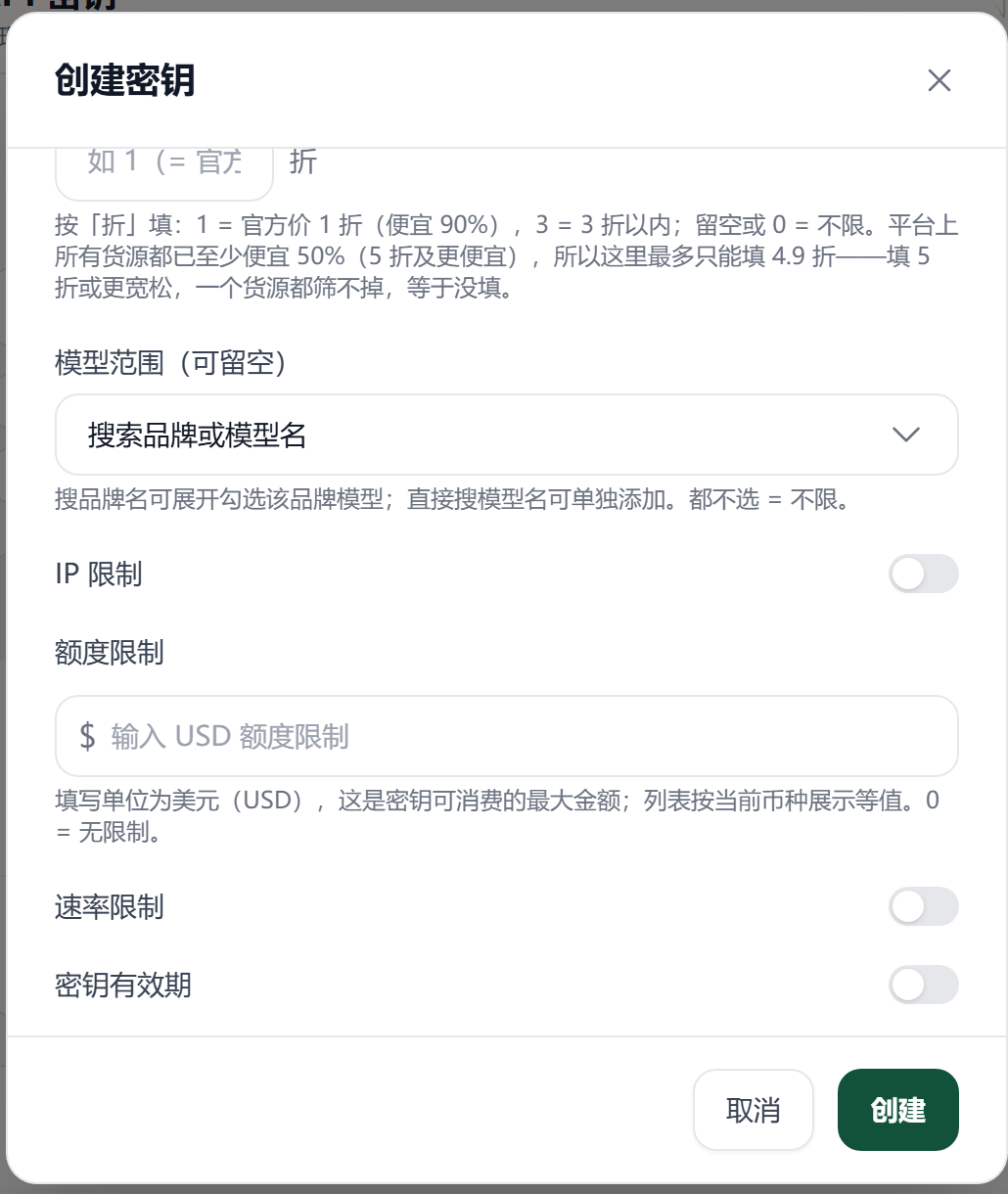
The entry is the "API Keys" page in the dashboard; each row has six buttons on the right: use key, import to CCS, disable, rotate, edit, delete. Below is the "create key" dialog - everything for step two is here.
Step one, disable. Click "disable" on that row, not "rotate" next to it. From now on the key in their hands is scrap paper - the error is API_KEY_DISABLED.
Step two, create a new one with quota and expiry filled in. In "create key" you can set total quota, three window limits (5-hour / 1-day / 7-day), expiry days, and IP whitelist. Give the new key a quota you can absorb - more honest than any security advice.
Step three, audit the account. "Usage records" sorted newest-first, watch three fields: model, amount charged, source IP. Measured, this page logs ip_address and user_agent (mine was 127.0.0.1 and Python-urllib/3.12). If that period shows an unfamiliar IP, or a model you never wrote, someone's been draining it.
Step four, harden. Leaks usually aren't bad luck - they're habit: keys pasted into frontends, committed to public repos, screenshot, dropped into online tools. One key per scenario, so when something leaks you can tell which chain it was.
Cause: this key has been disabled - usually you just clicked disable, or a co-tenant did.
Fix: re-enable it in the dashboard; if it leaked, don't re-enable - create a new one.
Cause: the key was deleted, or copied missing characters. Our keys are sk- plus 64 hex digits, 67 characters total - a length mismatch means an incomplete copy.
Fix: recopy in full; check the code didn't prepend sk- twice.
Cause: this key has an IP whitelist and the request came from outside it; or you're behind a proxy/container and the egress IP isn't what you think.
Fix: add the echoed IP to the whitelist; if it's an unfamiliar IP, treat it as a leak and disable first.
Cause: this key's total quota is exhausted. It's unrelated to account balance - topping up won't restore it.
Fix: raise or reset the quota under "edit". If you never set one and you're still limited, check balance and group in the console.
Cause: the model name is wrong, or this key restricts the allowed model range.
Fix: use the model plaza spelling; confirm the key has no model-scope restriction.
One, always set quota and expiry on your main key. Quota sets the loss ceiling per incident; expiry sets how long a stale key can be dug up and used.
Two, don't let keys show up in logs. Printing request headers or including the full URL in exceptions writes the key into log files - which is just leaking it somewhere else.
Three, separate environments. Use a tiny-quota key for local debugging and another for production, so a leak tells you instantly which side was exposed. Live per-model prices follow the model plaza - estimate daily spend against that price when setting a quota, don't guess.
The single most worthwhile thing to do right now: open the dashboard and put a quota on the key you're using. It may not save you today - but it will the day something leaks.
GPT-6.2 cuts list prices 20%, yet platform discounts run deeper: gpt-6-astra trades at under 1% of list. What this week's AI price war means for buyer
Prompt caching stores a repeated prompt prefix and bills cache reads at 5-12% of normal input. Real prices, hit conditions, and how to cut your API bi
Twelve Claude versions are on sale. The newest opus-5-5 costs $8.91 a month; the oldest opus-4-6 costs $49.50. Full table and a pick for each workload
gpt-5.6-terra and deepseek-v4.1-flash win on price and reliability; gemini-3.8-flash is fastest. Effective prices, measured speed, and a three-tier pi
Point your base URL at the platform and one key covers all 138 on-sale models across 51 vendors, in both OpenAI and Anthropic request formats. Copy-pa
 LONG AI